
Node.js Setup
The tools that follow depend on Node.js (which includes npm). Check whether it's already installed first, and install it only if it's missing.
1. Check whether it's installed
Open a terminal and run:
node -v
npm -v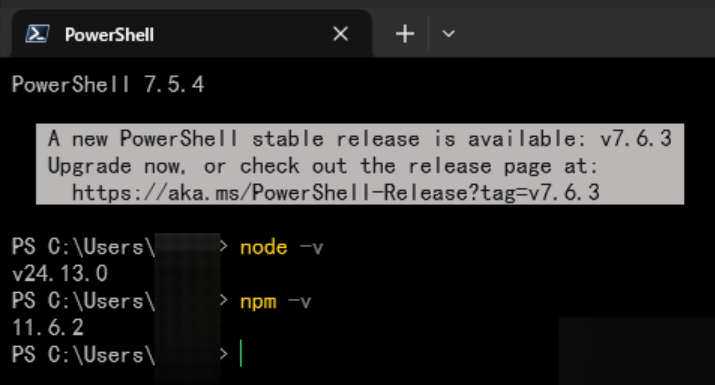
- Both print version numbers (as shown above) → already installed; you can skip the install step below.
- You see
command not foundornot recognized→ not installed yet; follow the next step.
2. Install Node.js (if missing)
Download it from https://nodejs.org (choose the LTS version) and follow the installer wizard.
After installing, reopen the terminal and run node -v and npm -v again — version numbers mean success.
3. Install the CLI tools
Once Node is installed, use npm to install the latest CLIs (pick what you need):
# Claude Code
npm i -g @anthropic-ai/claude-code@latest

# Codex
npm i -g @openai/codex@latest
Once installed, verify with the following commands (version numbers mean success):
claude --version
codex --version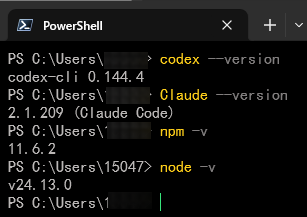
You can then use the claude / codex commands in the terminal. See the later guides for configuration.
4. Common issues
Q: permission denied / EACCES error
Pick the commands for your OS:
# Don't use sudo — move npm's global directory into your home directory
mkdir ~/.npm-global
npm config set prefix '~/.npm-global'
echo 'export PATH=~/.npm-global/bin:$PATH' >> ~/.bashrc   # zsh users: use ~/.zshrc
source ~/.bashrc# Run PowerShell / the terminal as Administrator, then retry the install command
# If it still fails, reinstall Node.js with the default path and permission options
npm i -g @anthropic-ai/claude-code@latestQ: command not found: codex
npm's global bin directory isn't on your PATH. Run the command below to find the path, then append its /bin directory to your system PATH:
npm config get prefix