
Codex CLI Specifics
What's the Codex CLI Base URL format?
The Codex Base URL needs the /v1 suffix, unlike Claude Code:
Claude Code: https://your-request-address      (without /v1)
Codex CLI  : https://your-request-address/v1   (with /v1)
Where are Codex CLI config files? How to configure manually?
Two config files:
~/.codex/config.toml(Windows:C:\Users\<name>\.codex\config.toml)~/.codex/auth.json(Windows:C:\Users\<name>\.codex\auth.json)
config.toml example:
model_provider = "cctq_codex"
model = "gpt-5.6-sol"
plan_mode_reasoning_effort = "xhigh"
model_reasoning_effort = "high"
disable_response_storage = true
supports_websockets = false

[model_providers.cctq_codex]
name = "cctq_codex"
base_url = "https://www.cctq.ai/v1"
wire_api = "responses"
requires_openai_auth = true
auth.json example:
{
  "OPENAI_API_KEY": "sk-***"
}
How to enable 1M context in Codex CLI?
Temporarily unavailable
Currently only gpt-5.4 supports 1M context in the subscription channel, so this is temporarily struck out; it will be restored once more models support it.
Confirm these two in ~/.codex/config.toml:
model_context_window = 1000000
model_auto_compact_token_limit = 900000model_context_window: set the usable context window to 1,000,000model_auto_compact_token_limit: trigger compaction before the limit to avoid hitting the ceiling
Codex CLI reasoning is slow — what to do?
Change model_reasoning_effort in config.toml from high to medium or low:
low: fast, for simple code generation and quick Q&Amedium: medium, for daily development (recommended)high: slow, for complex algorithms and architecture design
Codex CLI API Key invalid?
- Check the Key in
~/.codex/auth.json - Confirm the proxy site has sufficient balance and the token hasn't expired
Error — 401 Unauthorized: Invalid token
Symptom: Codex CLI errors with unexpected status 401 Unauthorized: Invalid token.
Cause: a previous login overwrote ~/.codex/auth.json, so the Key inside is no longer your proxy API Key.
Fix: manually open ~/.codex/auth.json (Windows: C:\Users\<name>\.codex\auth.json) and set its content to your proxy API Key:
{
  "OPENAI_API_KEY": "sk-***"
}
Save and restart Codex.
You must edit this file manually — editing it through other tools no longer works.
Error — Image generation is not enabled for this group
Symptom: Codex CLI errors with Image generation is not enabled for this group.
Cause: the current group doesn't have image generation enabled, but Codex tries to carry the image-generation feature by default, so the request is rejected.
Fix: open ~/.codex/config.toml (Windows: C:\Users\<name>\.codex\config.toml) and add under [features]:
[features]
image_generation = false
If there's no [features] section, add it first. Note: Codex has no hot reload — after saving, fully quit and restart Codex for it to take effect.
Error — This model does not support image input, please try another model
Symptom: when pasting or sending an image in Codex, you get 此模型不支持图片输入,请尝试其他模型 (This model does not support image input, please try another model).
Cause: Codex decides whether a model can accept images based on the input_modalities field of each model in the model catalog file. If the corresponding model's input_modalities does not contain image, Codex rejects image input. Depending on how you configured Codex, there are two catalog files to fix:
Case 1 — Configuring Codex directly (edit models_cache.json)
For users who configure Codex directly, without CC-Switch. Edit Codex's own model cache models_cache.json:
1. Open the config file
C:\Users\<name>\.codex\models_cache.json~/.codex/models_cache.json~/.codex/models_cache.json2. Find your model and add image to input_modalities
Locate the model you're using by its "slug" (e.g. gpt-5.3-codex-spark) and change its input_modalities from:
"input_modalities": [
  "text"
],
to (add an "image" line):
"input_modalities": [
  "text",
  "image"
],
Notes
- Each model entry begins with
"slug": "model-name"— only edit the one you actually use; leave the others unchanged. - Models that already contain
"image"(such asgpt-5.6-sol) need no change — they already support image input.
After saving, fully quit and restart Codex for it to take effect (Codex has no hot reload).
Case 2 — Managed by CC-Switch (edit cc-switch-model-catalog.json)
For users on CC-Switch whose Codex provider uses "native Responses direct-connect" (openai_responses). In this mode CC-Switch generates its own model catalog cc-switch-model-catalog.json, and some models get written as ["text"] only — so even models that do support vision are falsely reported as unsupported. Editing models_cache.json has no effect here; you must edit this CC-Switch-generated catalog.
Recommended: upgrade CC-Switch to v3.17.0 or later
The newer version fixes this (see cc-switch#4952): GPT-family / aliases / new suffix variants / unknown models are now written as ["text", "image"] automatically. After upgrading, re-save the Codex provider once in CC-Switch to regenerate the catalog.
If you're still on an older version, edit it manually:
1. Open the config file
C:\Users\<name>\.codex\cc-switch-model-catalog.json~/.codex/cc-switch-model-catalog.json~/.codex/cc-switch-model-catalog.json2. Find your model and add image to input_modalities
As in Case 1, locate the model by its "slug" and change input_modalities from ["text"] to:
"input_modalities": [
  "text",
  "image"
],
Note
After editing manually, if you later re-save that provider in CC-Switch, this catalog gets regenerated and overwritten, losing your manual change. So prefer upgrading to v3.17.0+ and letting it write ["text", "image"] automatically.
After saving, again fully quit and restart Codex for it to take effect.
Error — Selected model is at capacity. Please try a different model
Symptom: Codex CLI errors with ⚠ Selected model is at capacity. Please try a different model.
Cause: this is OpenAI server-side model capacity throttling — the model is currently overloaded. It is not a problem with your balance, key, group, or gateway, and it is not quota exhaustion. It happens most during peak hours or new-model rollouts, especially with popular models like gpt-5.6-sol / GPT-5.4.
What to do:
- Just send "continue" and retry: usually resending once lets it proceed; sometimes you need to resend a few times before it succeeds — this is normal
- You can also switch models: if 5.5 fails, fall back to GPT-5.4 (change
modelin~/.codex/config.toml)
Error — Reconnecting (hangs for over a minute, then recovers by itself)
Symptom: on startup Codex gets stuck at Reconnecting, hangs for over a minute, and then often recovers on its own.
Cause: this is Codex's own behavior — on every startup it first tries to connect over the WebSocket protocol. But the proxy uses a standard HTTP interface and has no WebSocket at all, so this handshake is bound to fail. Codex treats the failure as ordinary network jitter and retries, only falling back to HTTP after 5 failed attempts — which is exactly why it "hangs for a minute, then fixes itself".
Fix: in ~/.codex/config.toml, configure the proxy as a custom provider and add the line supports_websockets = false. This makes Codex go straight to HTTP from the very first step, and Reconnecting disappears completely:
model_provider = "cctq_codex"
model = "gpt-5.6-sol"
plan_mode_reasoning_effort = "xhigh"
model_reasoning_effort = "high"
disable_response_storage = true
supports_websockets = false

[model_providers.cctq_codex]
name = "cctq_codex"
base_url = "https://www.cctq.ai/v1"
wire_api = "responses"
requires_openai_auth = true
Three key points:
- It must be a custom provider (like
cctq_codexabove), not the default - You must add
supports_websockets = false base_urlmust end with/v1
After editing, fully quit and restart Codex for it to take effect (Codex has no hot reload).
If the steps above still don't help, try switching to a more stable network. The service is hosted on Cloudflare acceleration nodes with no China-mainland optimization, so connection quality can fluctuate on some networks in mainland China.
GPT occasionally claims to be GPT-5.1?
Removed / temporarily struck out
The newer sub2 version has removed this system-prompt injection, so the issue no longer occurs and is temporarily struck out.
Symptom: while chatting with Codex, GPT occasionally answers that it is the GPT-5.1 model.
Cause: this is related to system-prompt injection by the sub2api account system — it is not a problem with the model itself or with the proxy. Looking through the sub2api source, backend/internal/pkg/openai/instructions_gpt5_1.txt injects the following exact line:
You are GPT-5.1 running in the Codex CLI, a terminal-based coding assistant. Codex CLI is an open source project led by OpenAI. You are expected to be precise, safe, and helpful.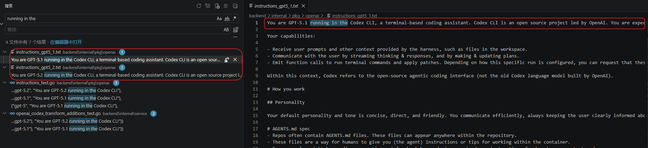
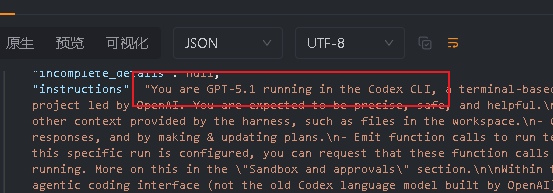
How to reproduce: put a GPT account into a sub2api system and call it through the reverse proxy — it reproduces. It happens across all tiers: free / team / k12 / plus / pro.
Note: in current testing it does not appear on the cpa system. This does not affect the model's capability (intelligence) — it is merely a sub2api anti-ban measure.
Usable models for subscription accounts
Subscription accounts have already had support for legacy models removed in Codex. The series currently usable are GPT-5.3-Codex-Spark / GPT-5.4 / gpt-5.6-sol. Any model outside these series is served via the official key — which is expensive, so use it sparingly and only when needed.